CB3.0 new firewall behavior
The firewall on the Centro Business 3.0 has been completely redesigned. The goal of these adjustments is to prevent unprotected router configurations while further increasing the security and stability of the Centro Business 3.0.
The optimizations and adjustments were communicated with the: Centro Business 3.0 Firmware Release Note "B41" (10.04.10).
Effects when migrating to firmware 10.04.10
This applies in the case of a "Firmware Upgrade" or "Backup & Restore"B18 / B19 / B40 "Balanced" ➜ B41 "Custom"
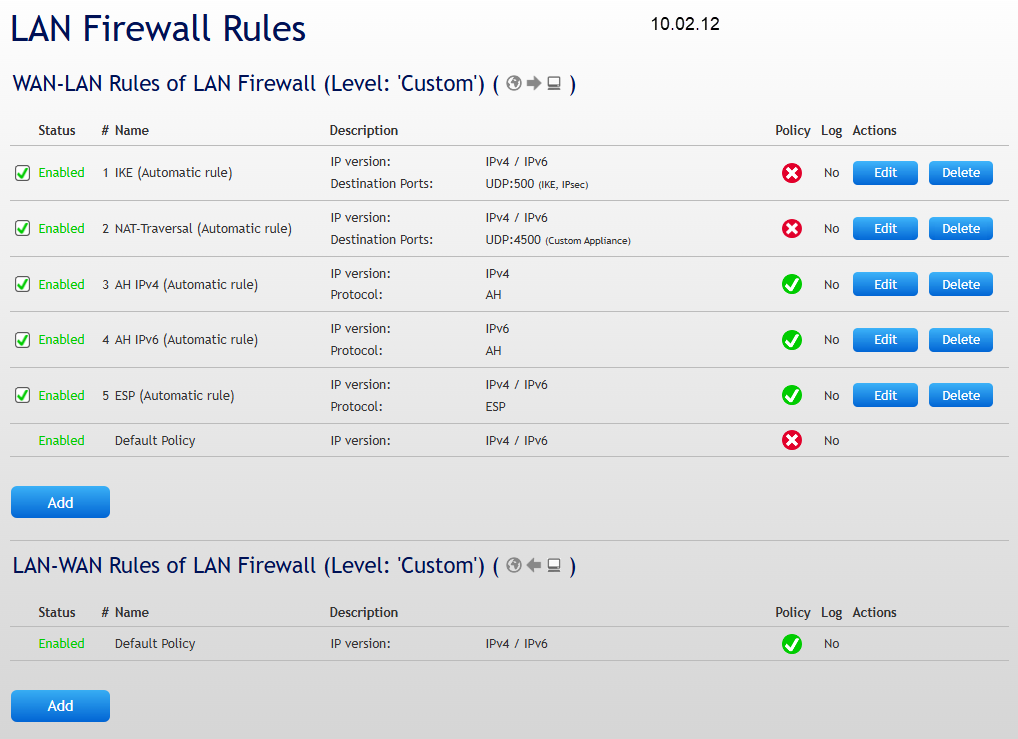
With firmware version 10.04.10, the predefined firewall mode "Balanced" was removed and replaced by the "Custom" mode. The "Custom" mode allows flexible and granular configuration of firewall rules and forms the new standard basis for individual security and network requirements. Existing Balanced firewall rules are automatically migrated to Custom mode.
DETAIL: B18 / B19 / B40 "Balanced" ➜ B41 "Custom"
This applies in the case of a "Firmware Upgrade" or "Backup & Restore"
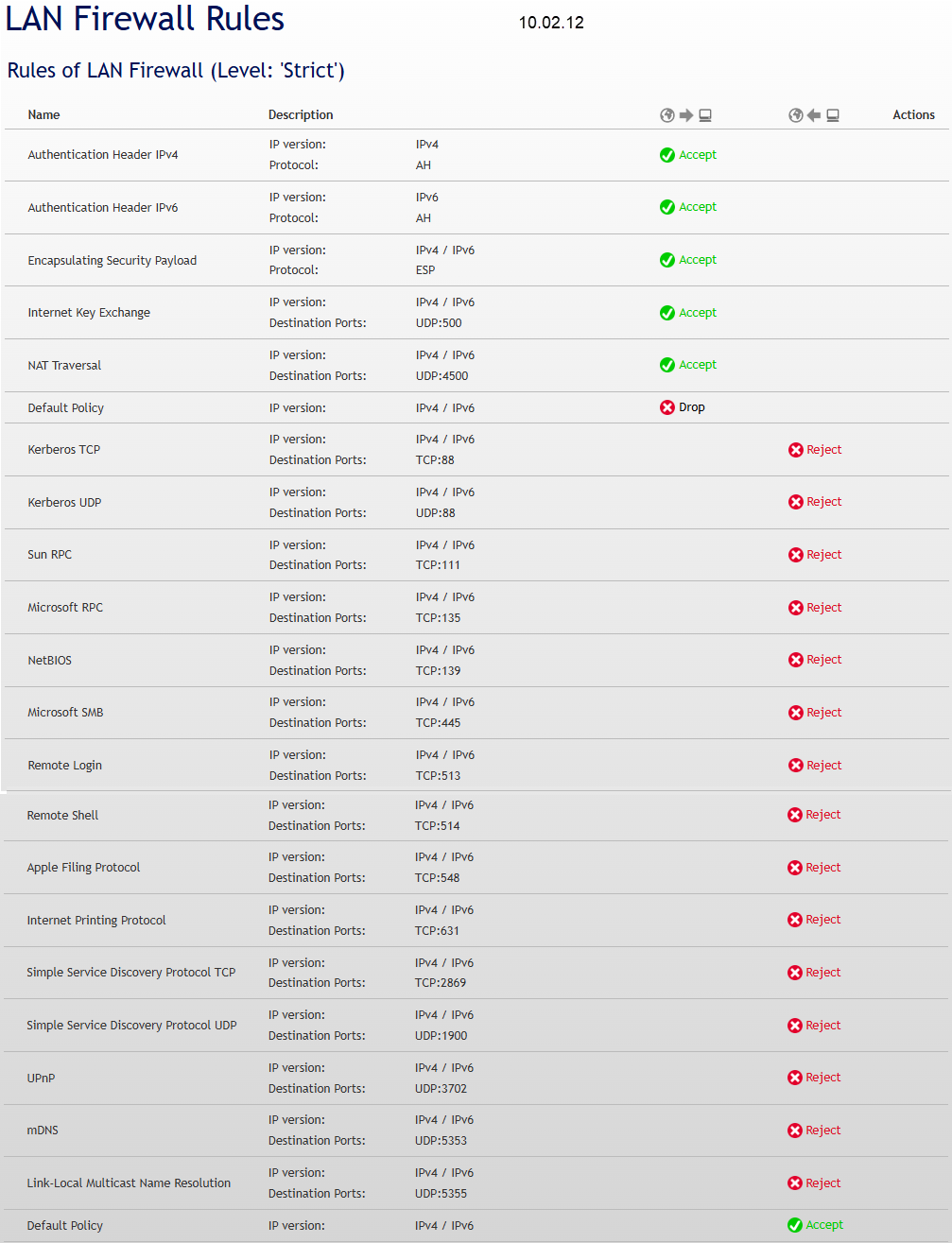
B18 / B19 / B40 "Strict" ➜ B41 "Strict"
The firewall mode "Strict" remains unchanged after the firmware update. All existing firewall rules are automatically adopted. Rules that were implicit or hidden in the previous firewall are now transparent and visible in the new firewall (e.g. IPsec), without changing the security behavior.
DETAIL: B18 / B19 / B40 "Strict" ➜ B41 "Strict"
This applies in the case of a "Firmware Upgrade" or "Backup & Restore"
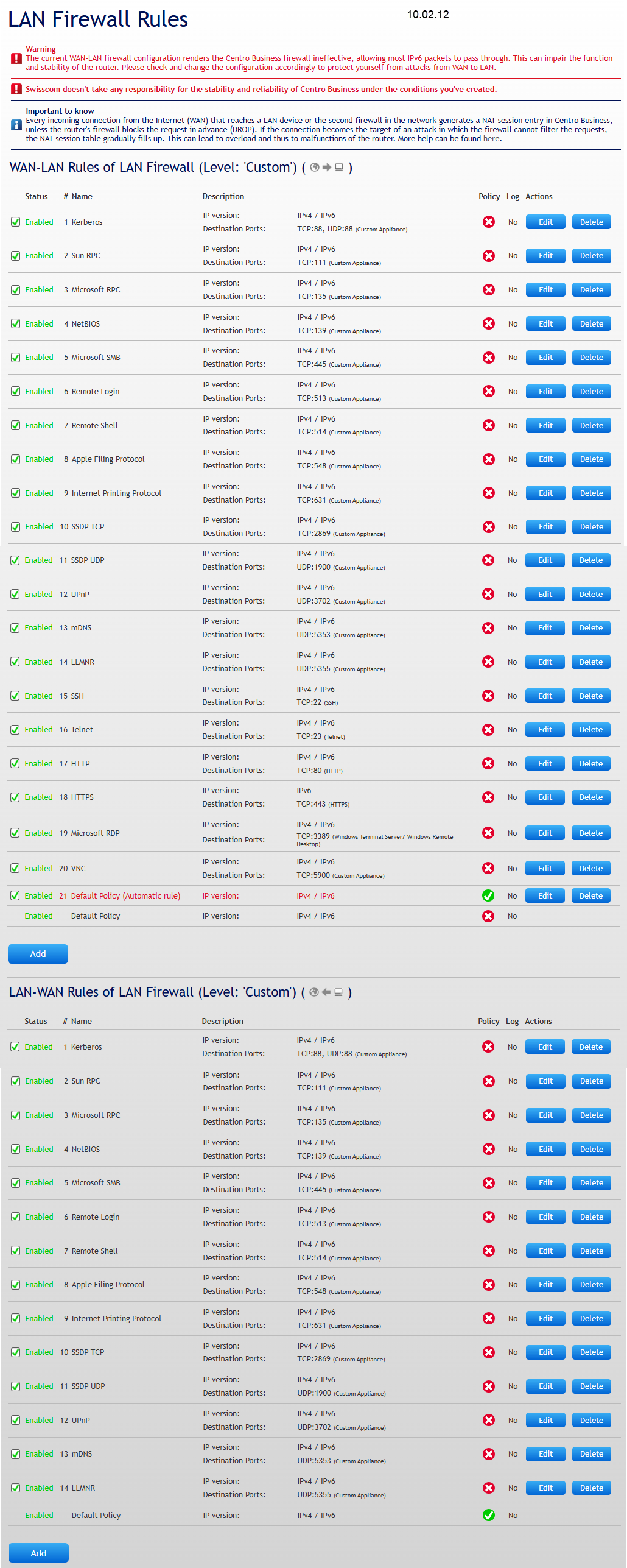
B18 / B19 / B40 "Custom" ➜ B41 "Custom"
The previous firewall mode "Custom" with user-defined rules is migrated to the "Custom" mode with the firmware update. All existing user-defined firewall rules are automatically adopted, so the existing configuration is preserved and no manual reconfiguration is required.
DETAIL: B18 / B19 / B40 "Custom" ➜ B41 "Custom"
This applies in the case of a "Firmware Upgrade" or "Backup & Restore"
B18 / B19 / B40 "OFF" ➜ B41 "Custom"
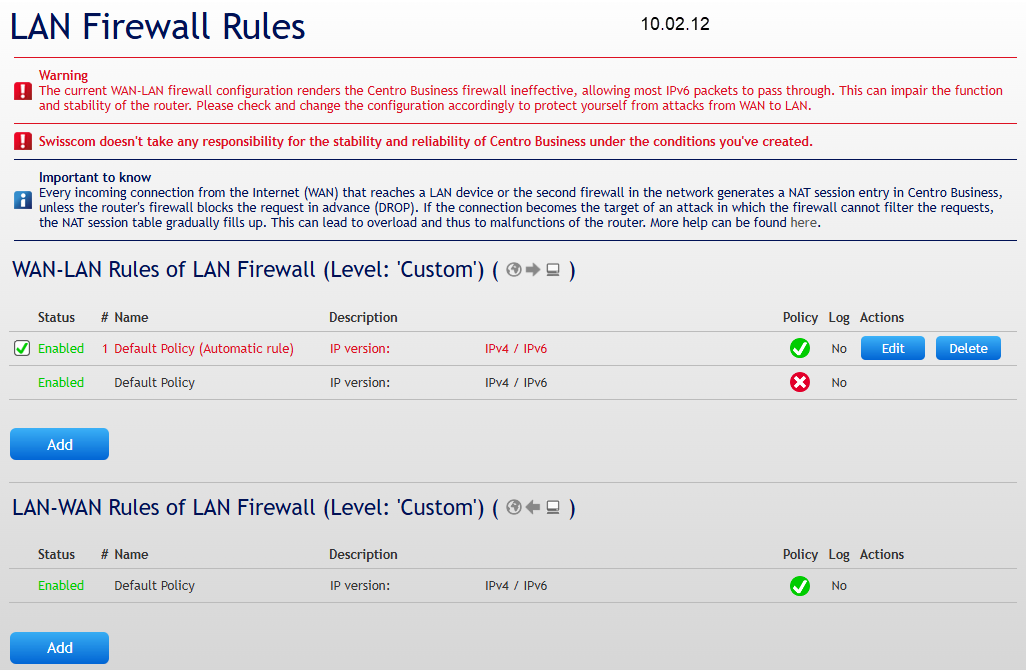
The previous firewall mode "OFF" is migrated to the "Custom" mode with the new firmware version 10.04.10. A rule that allows all traffic is automatically generated during this process.
Firewall status set to "Off" or "Any to Any" is not an option!
Especially when LAN infrastructure is made accessible on the internet, the user is 100% responsible for protecting themselves and the system! The customer contractually agrees to this obligation in the "Special Terms and Conditions for Internet".
This rule is highlighted in red to indicate the high security risk and to make the precarious configuration clearly visible.
Be sure to adjust your firewall!
DETAIL: B18 / B19 / B40 "OFF" ➜ B41 "Custom"
This applies in the case of a "Firmware Upgrade" or "Backup & Restore"
Effect when reset to factory settings
B41 "Strict" or "Custom" ➜ B41 "Strict"
In the event of a "Factory Reset" on firmware 10.04.10 or a new commissioning of the Centro Business 3.0, the firewall is activated in "Strict" mode by default. This automatically ensures a high level of security after the reset without requiring manual configuration.
Use a current backup file to perform a restore of the previous configurations.
DETAIL: B41 "Strict" or "Custom" ➜ B41 "Strict"
This applies in the case of a "Factory Reset"
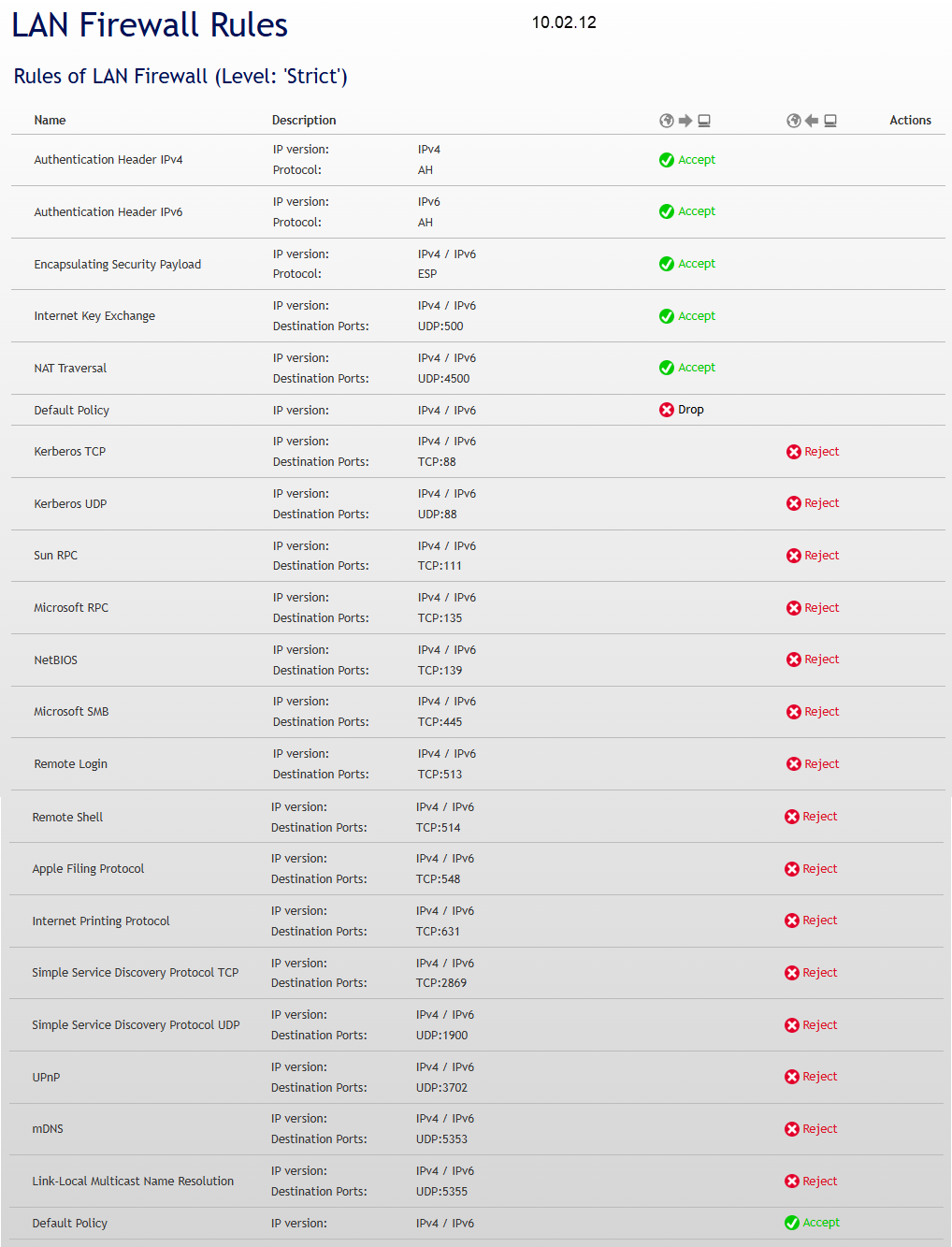
Switching from "Strict" to "Custom"
B41 "Strict" to "Custom"
After a factory reset or new installation, the firewall is active in "Strict" mode by default. If user-defined rules need to be created, the firewall mode must be changed to "Custom".
In Custom mode, a predefined rule already exists that blocks everything. New rules created by the user are inserted at the top of the rule order and take precedence over the default rule.
Use a current backup file to perform a restore of the previous configurations.
DETAIL: B41 "Strict" to "Custom"
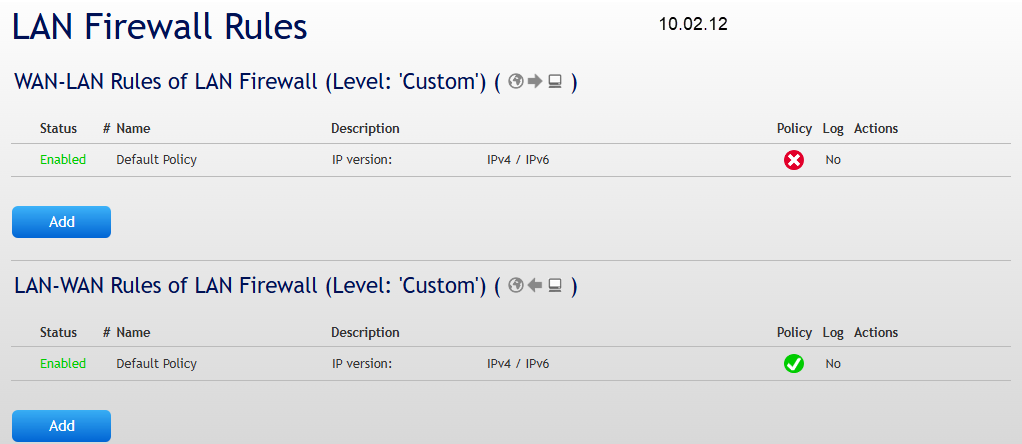
After complex manual local router configurations, a "Backup" is recommended!
Is something missing here? Give us your feedback!
Help us improve the CB-Guide. Let us know what content you are missing or how we can improve.
Send feedback