Firewall Management
The Centro Business Router provides two independent firewall variants. Under normal circumstances, the LAN firewall is active, and when the DMZ is used, the DMZ firewall is additionally active. For both cases, it is possible to configure personalisation through custom rules.
Firewall status set to Off is not an option!
Especially when LAN infrastructure is made accessible from the Internet, the user is 100% responsible for protecting themselves and the system!
The customer contractually agrees to this obligation with the "Special Internet Terms".
--- To restrict Internet traffic into the customer's LAN or DMZ, the firewall must be used. This is extremely important to ensure the security and stability of the customer infrastructure. :::warning
Important to know
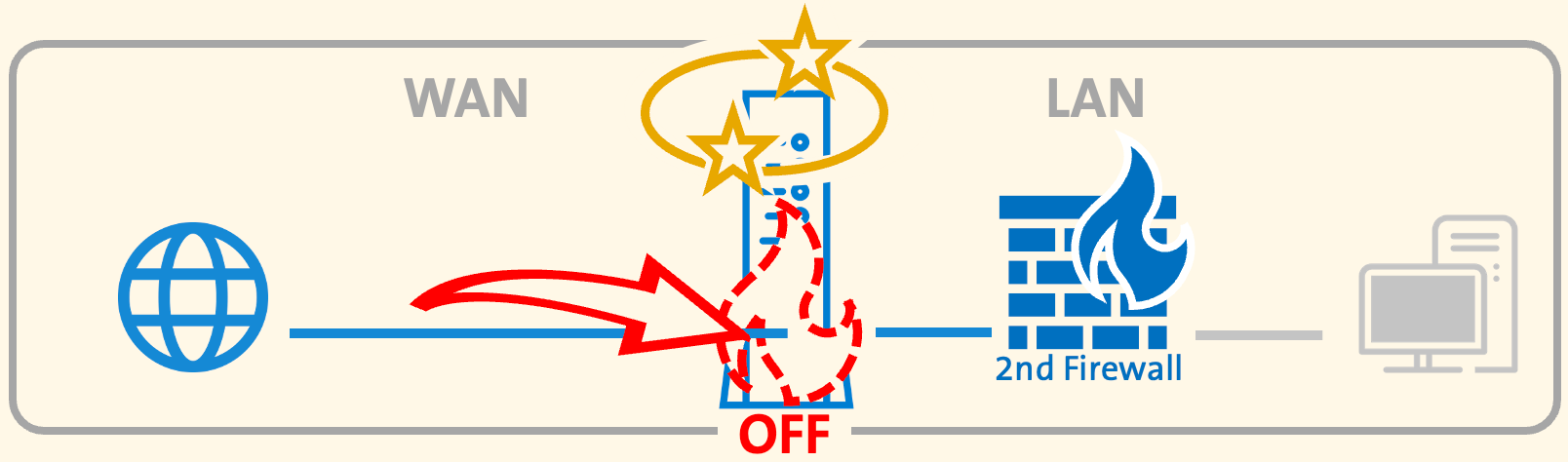
Any request originating from the Internet (WAN) that successfully reaches a LAN device (or the 2nd Firewall) in the network generates a NAT session entry on the Centro Business Router – provided that the router firewall has not already dropped the request beforehand.
If the connection becomes the target of an attack and the firewall is unable to effectively block the incoming requests, the NAT session table will fill up. This may ultimately lead to a malfunction of the router or cause instability.
 :::
:::
Configure firewall
- Centro Business 3.0 (until Q4-2025)
- Centro Business 3.0 (since Q4-2025)
- Centro Business 2.0
Basic settings (LAN and DMZ packet filters)
The firewall settings shown in the router portal under Firewall ➜ Basic settings depend on the connection or on the use of fixed IP addresses.
If no fixed public IP addresses are subscribed or DMZ is not activated, only the LAN firewall will be shown.
If DMZ is activated, both the LAN and the DMZ firewall will be displayed.
For each firewall, one of the following firewall levels can be selected:
- Balanced (Default):
Provided the corresponding port forwarding rules are configured, the firewall forwards all outgoing and incoming traffic to and from the LAN or DMZ in this operating mode, except for a defined group of protocols.
- Strict:
The firewall blocks incoming traffic to the LAN or DMZ, except for a small number of rules used for router management. Regarding outgoing traffic from the customer LAN or DMZ, only a small group of ports is blocked.
- Custom:
All incoming traffic for IPv4 and IPv6 addresses to the customer LAN is blocked. All outgoing traffic from the customer LAN is allowed.
- OFF: Swisscom does NOT recommend this!
The firewall is disabled. Both incoming and outgoing connections to and from the customer LAN or DMZ are allowed, and there is a risk of a malfunction due to a full NAT session table.
Add or edit filter rules
Once the firewall level for LAN or DMZ is set to Custom, individual rules can be created or existing ones adjusted. It must be defined whether incoming traffic from the Internet or outgoing traffic from the customer network should be filtered.
New rules are created via Add in the corresponding sections: LAN firewall rules, DMZ firewall rules, WAN-LAN rules or LAN-WAN rules.
Each filter rule consists of the following data elements:
Rule settings
- Name (can be chosen individually)
- Status (enabled/disabled)
- Logs (yes/no) --> Only to be activated for troubleshooting cases
Edit policies
- Policies (accept or drop)
- Destination ports (predefined port or individually by creating a "Custom Appliance" for a single port, port range or multiple ports or ranges)
- Source ports (predefined port or individually by creating a "Custom Appliance" for a single port, port range or multiple ports or ranges)
IP address rules
- IP version (any, IPv4 or IPv6)
- Destination type (IPv4 or IPv6) any address / single address / subnet / address range
- Source type (IPv4 or IPv6) any address / single address / subnet / address range
The optimizations and adjustments were communicated with Centro Business 3.0 Firmware Release-Note "B41" (10.04.10)
Learn more about the new CB3.0 firewall behavior at "CB3.0 Firewall Behavior"!
Basic settings (LAN and DMZ packet filters)
The firewall settings shown in the router portal under Firewall ➜ Basic settings depend on the connection or the use of fixed IP addresses.
If no fixed public IP addresses are subscribed or DMZ is not activated, only the LAN firewall will be shown.
If DMZ is activated, both the LAN and the DMZ firewall will be displayed.
For each firewall, one of the following firewall levels can be selected:
- Strict (Default): The firewall blocks incoming traffic to the LAN or DMZ, except for a small number of rules used for router management. Regarding outgoing traffic from the customer LAN or DMZ, only a small group of ports is blocked.
- Custom: All incoming traffic for IPv4 and IPv6 addresses to the customer LAN is blocked. All outgoing traffic from the customer LAN is allowed.
Add or edit filter rules
Once the firewall level for LAN or DMZ is set to Custom, individual rules can be created or existing ones adjusted. It must be defined whether incoming traffic from the Internet or outgoing traffic from the customer network should be filtered.
New rules are created via Add in the corresponding sections: LAN firewall rules, DMZ firewall rules, WAN-LAN rules or LAN-WAN rules.
Each filter rule consists of the following data elements:
Rule settings
- Name (can be chosen individually)
- Status (enabled/disabled)
- Logs (yes/no) --> Only to be activated for troubleshooting cases
- Protocols ("Any", ICMP only, GRE only, AH only, ESP only)
Edit policies
- Policies (accept or drop)
- Destination ports (predefined port or individually by creating a "Custom Appliance" for a single port, port range or multiple ports or ranges)
- Source ports (predefined port or individually by creating a "Custom Appliance" for a single port, port range or multiple ports or ranges)
IP address rules
- IP version (any, IPv4 or IPv6)
If IPv4 or IPv6 is selected:
- Destination criterion type (IPv4 or IPv6) any address / single address / subnet / address range
- Source criterion type (IPv4 or IPv6) any address / single address / subnet / address range
Basic settings (LAN and DMZ packet filters)
The firewall settings shown in the router portal under Firewall ➜ Basic settings depend on the connection or the use of fixed IP addresses.
If no fixed public IP addresses are subscribed or DMZ is not activated, only the LAN firewall will be shown.
If DMZ is activated, both the LAN and the DMZ firewall will be displayed.
For each firewall, one of the following firewall levels can be selected:
- Balanced (Default):
Provided the corresponding port forwarding rules are configured, the firewall forwards all outgoing and incoming traffic to and from the LAN or DMZ in this operating mode, except for a defined group of protocols.
- Strict:
The firewall blocks incoming traffic to the LAN or DMZ, except for a small number of rules used for router management. Regarding outgoing traffic from the customer LAN or DMZ, only a small group of ports is blocked.
- Custom:
All incoming traffic for IPv4 and IPv6 addresses to the customer LAN is blocked. All outgoing traffic from the customer LAN is allowed.
- OFF: Swisscom does NOT recommend this!
The firewall is disabled. Both incoming and outgoing connections to and from the customer LAN or DMZ are allowed, and there is a risk of a malfunction due to a full NAT session table.
Add or edit filter rules
Once the firewall level for LAN or DMZ is set to Custom, individual rules can be created or existing ones adjusted. It must be defined whether incoming traffic from the Internet or outgoing traffic from the customer network should be filtered.
New rules are created via Add in the corresponding sections: LAN firewall rules, DMZ firewall rules, WAN-LAN rules or LAN-WAN rules.
Each filter rule consists of the following data elements:
Rule settings
- Name (can be chosen individually)
- Status (enabled/disabled)
- Logs (yes/no) --> Only to be activated for troubleshooting cases
Edit policies
- Policies (accept or drop)
- Destination ports (predefined port or individually by creating a "Custom Appliance" for a single port, port range or multiple ports or ranges)
- Source ports (predefined port or individually by creating a "Custom Appliance" for a single port, port range or multiple ports or ranges)
IP address rules
- IP version (any, IPv4 or IPv6)
- Destination type (IPv4 or IPv6) any address / single address / subnet / address range
- Source type (IPv4 or IPv6) any address / single address / subnet / address range
FAQ – Firewall Management
What is a firewall?
A firewall is a physical or virtual network security application
that monitors both incoming and outgoing network traffic
and acts as a secure "gateway" between the network and the public Internet.
How do firewalls work?
A firewall acts as a secure gateway and analyses incoming and outgoing data packets
to determine whether they can be safely forwarded through the gateway.
Can I save a complex firewall configuration?
Yes, more details can be found in the chapter Backup and Restore
Do I need multiple firewalls?
This depends entirely on the customer’s setup.
For private use or a single office, typically only one firewall is required.
For larger organisations, multiple firewalls may be used, depending on network size – especially if the network includes branch offices, remote users, etc.
What can happen if I do not use a firewall?
If the firewall is disabled, all incoming and outgoing traffic may pass through the Swisscom network without restriction. Attacks are the immediate consequence! This severely impacts the trust level and the reputation of the ISP at an international level (blacklisting). Swisscom does NOT recommend this!
Are you missing something here? Give us your feedback!
Help us improve the CB-Guide. Let us know what content you are missing or how we can improve.
Send feedback