Ports, LEDs and Buttons
Descriptions of ports and LED explanations for the various routers can be found here.
info
PROTOTYPE
We are developing a new format here for the previous instructions, which were exclusively provided as PDF documents.
Select your router model:
- Centro Business 3.0
- Centro Business 2.0
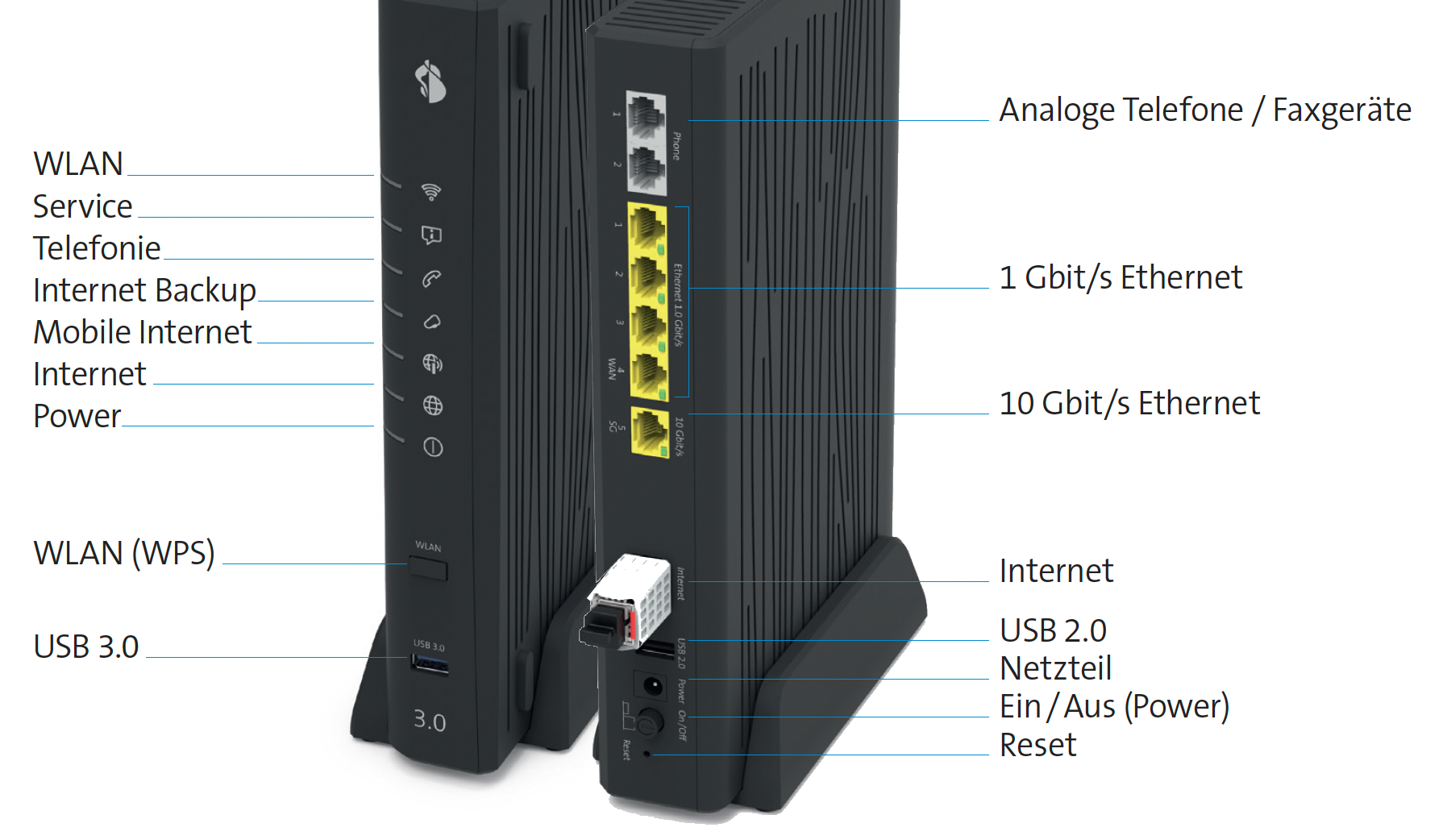
| Icon | Description |
|---|---|
 | WLAN LED |
 | LED off – WLAN is switched off. |
 | LED glowing blue – WLAN is switched on. |
 | LED flashing white – WPS mode is active. |
 | Service LED |
 | LED glowing white – Site networking (BNS/EC-S) is activated. |
 | LED glowing red – Site networking is interrupted. |
 | Telephony LED |
| LED off – No telephony services subscribed or a fault is present. |
 | LED glowing green or white – Telephony is activated. |
| LED glowing red – No number registered yet or registration is in progress. |
 | Internet Backup LED (Customers with "Internet Backup failover" service) |
| LED off – No backup stick connected. |
| LED flashing white (1-2x per sec.) – Backup stick is being installed. |
| LED glowing white – Backup service is ready. |
 | LED flashing white/red – Internet Backup is in operation. |
| LED glowing red – A fault is present. |
 | LED flashing red rapidly (3-4x per sec.) – Error occurred during activation. |
 | Mobile Internet LED |
| LED off – No connection to a Mobile Internet device. |
 | LED flashing green – Connection to Mobile Internet is being established. |
 | LED glowing green – Mobile Internet is active. |
| LED glowing red – A fault is present. |
 | Internet LED |
| LED off – No connection to the internet. |
| LED flashing white – Connection to the internet is being established. |
| LED glowing white – Internet connection is active and IP address assigned. |
| LED glowing red – A fault is present. |
 | Power LED |
| LED off – Router is switched off (check power supply). |
| LED flashing white – Router is starting, being configured, or receiving an update. |
| LED glowing white – Router is ready for operation. |
| LED glowing red – A fault is present. |
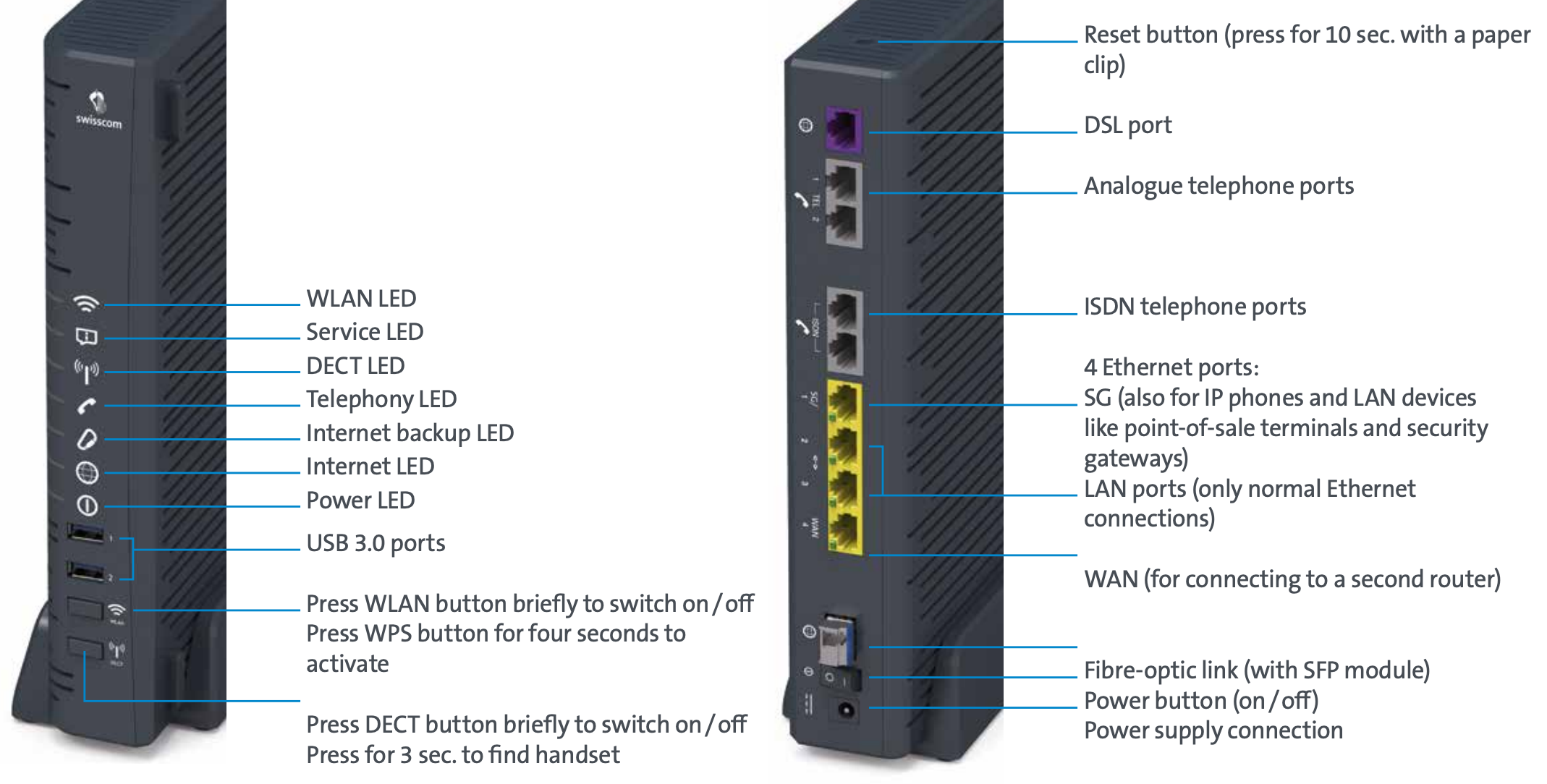
| Icon | Description |
|---|---|
| WLAN LED |
| LED off – WLAN is switched off. |
| LED glowing blue – WLAN is switched on. |
| LED flashing white – WPS mode is active. |
| Service LED |
| LED glowing white – Site networking (BNS/EC-S) is activated. |
| LED glowing red – Site networking is interrupted. |
 | DECT LED |
| LED off – DECT is switched off. |
| LED glowing blue – DECT is switched on. |
| LED flashing white – Connection mode is activated. |
| LED glowing red – A fault is present. |
| Telephony LED |
| LED off – No telephony services subscribed or a fault is present. |
| LED glowing green or white – Telephony is activated. |
| LED glowing red – No number registered yet or registration is in progress. |
| Internet Backup LED (Customers with "Internet Backup failover" service) |
| LED off – No backup stick connected. |
| LED flashing white (1-2x per sec.) – Backup stick is being installed. |
| LED glowing white – Backup service is ready. |
| LED flashing white/red – Internet Backup is in operation. |
| LED glowing red – A fault is present. |
| LED flashing red rapidly (3-4x per sec.) – Error occurred during activation. |
| Internet LED |
| LED off – No connection to the internet. |
| LED flashing white – Connection to the internet is being established. |
| LED glowing white – Internet connection is active and IP address assigned. |
| LED glowing red – A fault is present. |
| Power LED |
| LED off – Router is switched off (check power supply). |
| LED flashing white – Router is starting, being configured, or receiving an update. |
| LED glowing white – Router is ready for operation. |
| LED glowing red – A fault is present. |
FAQ – Router Installation
Why are my LEDs not glowing brightly?
Centro Business 2.0:
- The installed LEDs have a theoretical lifespan of approx. 5-7 years, during which a loss of luminosity of approx. 40% is normal. Due to a combination of operating time and ambient temperature, they unfortunately "burn out". This has no impact on the function of the router.
Centro Business 3.0:
- To optimize the lifespan of the LEDs in the CB3.0, a dimming process (75%) has been implemented which dynamically controls the luminosity when the device is handled. For example, when the WLAN button is pressed, the LEDs are "awakened".
Can I restore a complex router configuration after a new setup?
Yes, find out more in the chapter Backup and Restore
info
Are you missing something here? Give us feedback!
Help us improve the CB-Guide. Let us know what content you are missing or how we can improve.
Send feedback