Firmware Management
For Centro Business router models, continuous stabilization and security measures or further developments must be undertaken due to legal requirements from OFCOM (Federal Office of Communications). These are rolled out to all routers in the form of new firmware versions. More on the Firmware Release Notes.
These updates are initiated automatically by Swisscom at its own discretion via "Device Management" Details. Typically, this happens during the night between 2:00 and 6:00. There are different procedures for how a router can receive revised firmware:
Automated Firmware Update Procedures
Automated Procedures:
Immediate Firmware Update (IFU)
If a Centro Business with older firmware is put into operation for the first time (factory state), the latest version is installed immediately via "Device Management" if necessary. This extends the installation process by approx. 10 minutes and guarantees that all functions and standards are compatible and secure according to the latest state.
Automated Firmware Rollout
Depending on the router model, Swisscom plans 1-2 rollouts per year. Routers are usually updated in tranches Tuesday through Thursday during the night (between 2:00 - 6:00) via "Device Management". This leads to a connection interruption of approx. 10 minutes.
The Centro Business 2.0 / 3.0 Rollout Plan  is published accordingly.
Manual Firmware Update Procedures
Locally in the Router Portal
In the router portal under Router - Firmware, the following options exist:
- Let the router check if "Device Management" has provided newer firmware
- Load a firmware file locally from a PC into the router
Since the firmware update generates a service interruption, the portal offers to execute the update in the coming night at 2:00. (A reboot deletes this task)
FAQ - Firmware Management
How to install firmware?
Use only the latest firmware files, which you have download here from Swisscom!
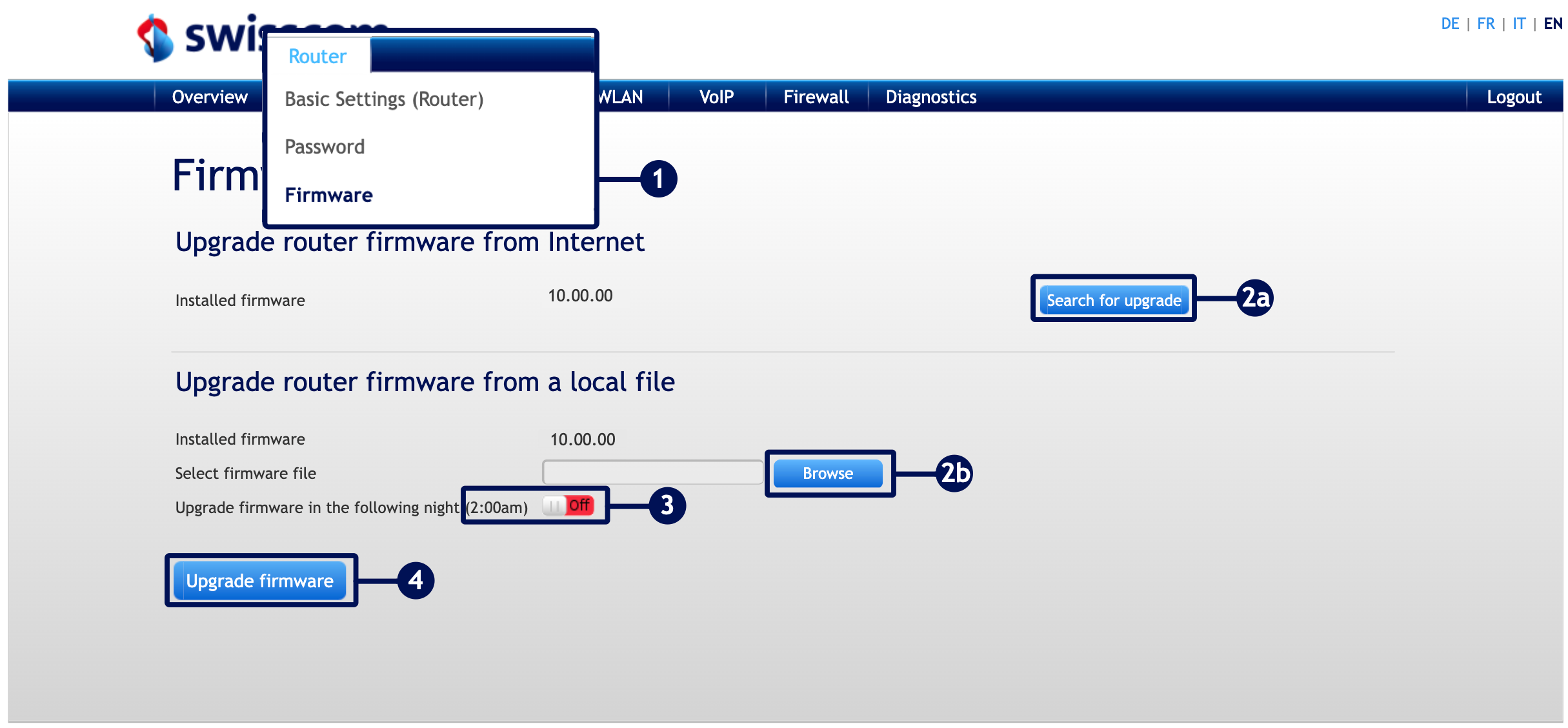
-
Connect your router locally via Ethernet cable or remotely and open the router portal by entering the URL 192.168.1.1 in your browser. Go to "Router" > "Firmware".
- A: You can find the latest firmware by clicking "Check for updates".
- B: If you have already saved a firmware file locally, click "Browse" to upload the firmware file.
-
Use the slider to choose whether to update immediately or at 02:00.
-
Click "Update firmware".
Can a firmware update be prevented?
No: As soon as automated procedures come into play, an update cannot be prevented.
- Reasoning:
- The functional scope is homogenized and dependencies are guaranteed (New product/new service can be used unhindered by every Swisscom customer).
- Security gaps are guaranteed to be closed.
How does Swisscom ensure that new firmware versions contain no errors?
- Development Phase: In iterative software development, router firmware is modified step by step and confronted and validated early on in automated test lab facilities with hundreds of recurring use cases. Smallest deviations are identified and rectified immediately.
- Pilot Phase (Beta): If a new firmware is nearing completion, it is usually installed as a beta version on several thousand customer routers. In addition to systematic status monitoring, customer reports are channeled to experts to rule out possible firmware effects.
- Rollout Monitoring: Within the scope of legal possibilities, Swisscom monitors the installed router base and analyzes any problems. Findings flow directly into the ongoing development phase or as bug fixes into the next firmware.
Centro Business 2.0: has very old firmware 8.XX.XX installed. What must be done?
Very rare: If the router carries firmware that is very old (8.XX.XX), only a manual and sequential procedure can ensure the latest firmware.
- Manual firmware upgrade to version 9.02.06 ➜ Download

- Manual firmware upgrade to version 9.04.12 ➜ Download
- The update to the latest firmware version now happens automatically when the router is put into operation. Details "Firmware Release Notes"
Is something missing here? Give us your feedback!
Help us improve the CB-Guide. Let us know what content you are missing or how we can improve.
Send feedback